

Employee benefits guide template: How to create better guides faster

An employee benefits guide template helps benefits advisors and HR admins skip the blank page, but it doesn't touch the hardest part of the work. Turning plan documents, rates, eligibility rules, carrier details, compliance language, and employer branding into one accurate, employee-ready guide is still a heavy lift.
A template gives you the starting shape you need. Building the final version still takes careful data collection, writing, formatting, review, and updates. That's why teams working in Microsoft Word or PDFs often spend weeks, sometimes months, on a single guide.
AI has changed what's possible here, though. Pasito's guide production process pulls from shared plan configuration data, tokenized fields, and customizable branding to turn that same work into something you can finish in minutes.
What is an employee benefits guide template?
An employee benefits guide template is a reusable, structured document for explaining an employer's benefits program. It usually includes sections for medical, dental, vision, life, disability, voluntary benefits, HSA/FSA, retirement benefits, eligibility, enrollment steps, and carrier contacts.
Employees need one place to understand what's available, what's changed, what each option costs, and how to enroll. For advisors and HR teams, the guide isn't optional work. It's part of getting people through open enrollment with fewer questions, fewer misunderstandings, and fewer support tickets.
It's important to be accurate
It's worth being precise about what's legally required and what isn't when you build and deliver benefits information. ERISA doesn't require employers to produce a "benefits guide." It requires a summary plan description, or SPD, written in plain language and distributed to plan participants.¹ A carrier's booklet usually doesn't meet that standard on its own.
The benefits guide is the employee-facing companion to those required documents. It isn't the compliance document itself, but it pulls from the same plan data, so accuracy carries real weight.
Accuracy is only half of it. The materials you hand employees also have to be accessible. The ADA expects benefits resources to work for people with disabilities, including employees who rely on screen readers, so an inaccurate guide and an inaccessible one both create exposure. Pasito's ADA Compliance Agent scans your benefits resources for that risk and flags it before anything reaches an employee.
None of that makes the guide easy to create.
A template might give the document a shape, but it doesn't do the thinking. It doesn't know what changed this year. It can't confirm whether contribution amounts match the final rate sheet. It won't translate plan language into explanations an employee can actually follow, and it won't flag where compliance-related language needs another set of eyes. The template is the starting line, not the finished guide.
Why "templates" take so long to complete
An employee benefit guide template can look simple because the output is familiar. A polished PDF, a printed booklet, a shareable digital guide. Behind that output sits a long chain of operational work.
Here's the part worth slowing down on. What most advisors call a "template" is really a static file with placeholder text. A Word document with last year's guide in it and some brackets where the numbers go. That file doesn't connect to anything. When a rate changes, nothing updates. When a carrier swaps out, you're retyping. The "template" saves you the layout and almost nothing else.
A real production system works differently. Instead of placeholder text you re-type over by hand, the data lives in one place and flows into every guide automatically. Change a contribution amount once, and it updates everywhere that number appears. That's the gap between a static Word file and a dynamic AI platform like Pasito: one is a shape you fill in, the other is a connected system that keeps the whole guide grounded in up-to-date plan data.
Teams pull plan information from a lot of sources. SBCs,² renewal files, rate sheets, carrier summaries, contribution tables, enrollment systems, and internal HR notes. Then they decide what belongs in the employee-facing guide, what belongs in supporting documentation, and what needs review before it goes out. And that's before you account for separate versions for each eligibility class and a full Spanish translation.
The process usually runs like this:
- Collecting plan documents and contribution data
- Identifying what changed from the prior year
- Writing employee-friendly plan descriptions
- Formatting comparison tables
- Applying advisor and employer branding
- Reviewing eligibility rules and notices
- Checking accuracy across every page
- Routing the guide through approvals
- Exporting and sharing the final version
- Updating the guide when plan details change
- Configuring eligibility classes
- Mutli-language document translation
That's a lot of work to hang on something we casually call a "template."
The compliance work is easy to underestimate
Benefits guides aren't casual marketing documents. Employees use them to understand coverage, compare plans, and make enrollment decisions. The content has to be clear, accurate, and aligned with the plan materials underneath it.
This is where ERISA comes back into the picture. The plan information employees rely on has to be accessible and accurate, and the guide is often the version people actually read. If the guide misstates coverage, you've created confusion at the exact moment someone's making a decision they'll live with all year. Compliance risk tends to hide in small details. A deductible shown incorrectly. A waiting period copied from last year. A contribution table that doesn't match final rates. A plan description simplified to the point that it changes the meaning. A required notice that quietly went missing.
Static files make this harder, because they cut the guide off from its source data. Once plan information is scattered across a Word doc, a PDF, a slide deck, a spreadsheet, and an email thread, every update becomes a manual hunt. One change can create five places to check.
This is where Pasito's approach changes the math. Plan data lives in a tokenized system, so every number in the guide traces back to a single source. Update the source and the guide updates with it, which takes copy-paste error off the table. The ADA Compliance Agent handles the other half, scanning every benefits resource against WCAG accessibility standards, so the review step isn't riding on someone catching a problem at 11 p.m. before a document goes out to employees.
What should an employee benefits guide include?
A strong guide helps employees answer four practical questions:
- What benefits are available to me?
- What changed this year?
- How do I compare my options?
- What do I need to do next?
Most guides should include:
- Enrollment overview: Key dates, eligibility, enrollment steps, and where to get help. This section should make the first action obvious, so employees know when decisions are due, who can enroll, and where to go next.
- Medical plans: Plan options, costs, deductibles, out-of-pocket maximums, networks, and prescription details. This is usually the most-read section, so it needs to be accurate, scannable, and easy to compare.
- Dental and vision: Coverage levels, employee costs, provider information, and plan highlights. Simpler than medical, but employees still need enough detail to understand value and network access.
- Spending accounts: HSA, FSA, HRA, or commuter benefit details where they apply. Explain who's eligible, how contributions work, and how to use the account during the year.
- Life and disability: Employer-paid and voluntary options. Employees need to know what's provided, what they can elect, and whether evidence of insurability applies.
- Voluntary benefits: Available programs, costs, eligibility, and enrollment rules. Explain optional benefits clearly without turning the guide into a carrier brochure.
- Contacts and resources: Carrier contacts, HR support, decision-support tools, and benefits assistant links. Employees should know exactly where to go when they need help.
- Compliance information: Required notices, disclaimers, and references where applicable. Handle this carefully, because missing or inaccurate language creates confusion and review risk.
What to look for in an employee benefit guide template
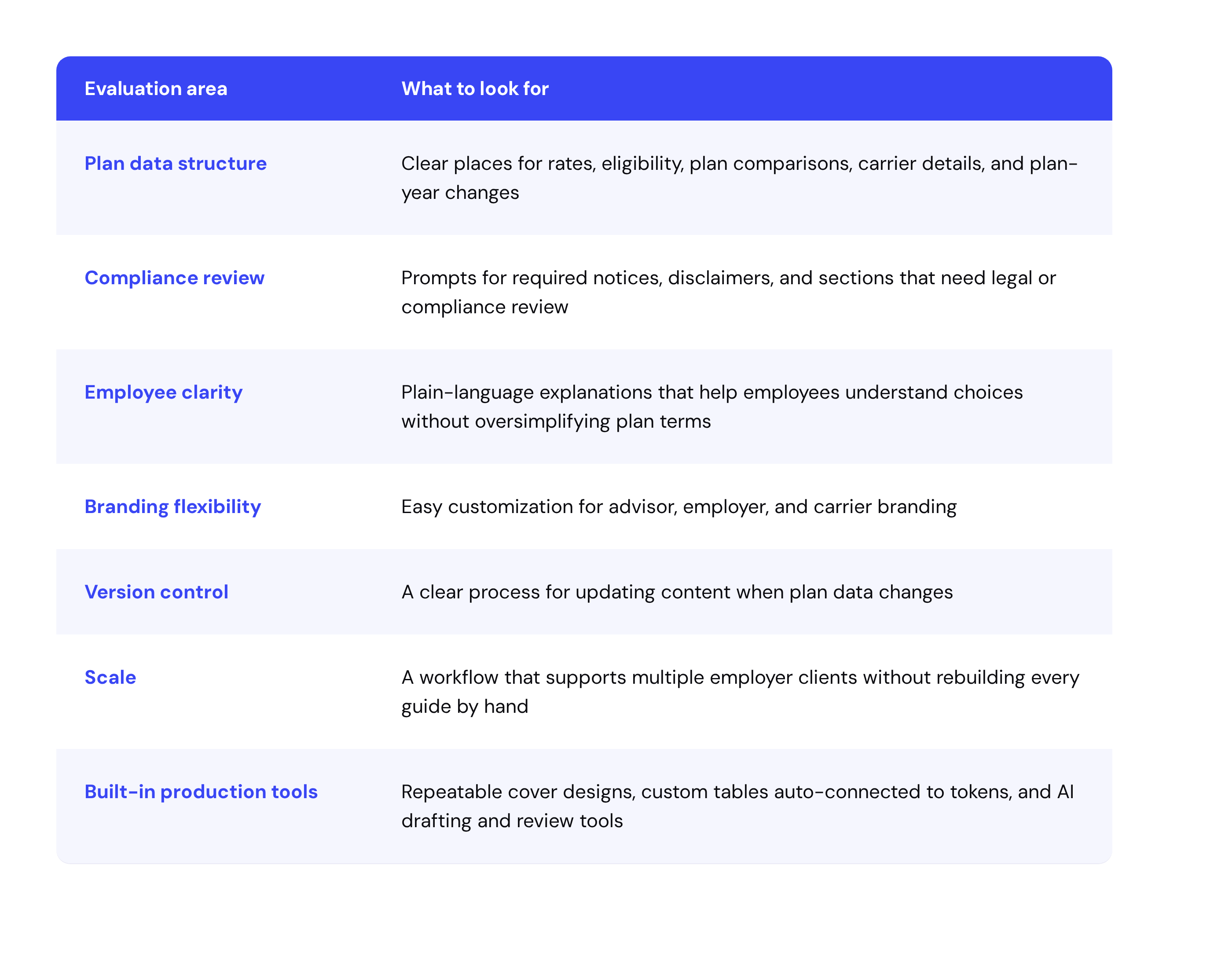
If your team uses a template, judge it by the work it removes, not the pages it hands you. A good one makes the guide easier to produce, review, update, and reuse across clients, and it points to where plan-specific information belongs and where compliance review is needed.
Run through this checklist before you commit to one:
Why Word and PDF templates aren't enough for modern benefits teams
Word and PDF templates can work when you're making one guide for one employer with a simple plan design. They fall apart the moment you need speed, accuracy, and scale at the same time.
Advisors often produce guides across a whole book of business. Every employer brings different carriers, contribution strategies, eligibility rules, voluntary benefits, and branding. HR admins get last-minute updates before open enrollment or after a renewal decision shifts. Static templates weren't built for that kind of change, year after year after year.
They force teams to move information from plan documents into copy, tables, and design files by hand. They spawn separate versions that are hard to audit. They make updates slow because every downstream asset needs another check. Modern teams want the same shareable output with a better engine behind it.
How Pasito Benefits Guides turns months into minutes
Pasito Benefits Guides is the modern alternative to the traditional template. You get the polished, shareable output you'd expect, without building every guide from scratch.
Instead of opening a static Word or PDF file, Pasito pulls from shared plan configuration data. AI agents generate clear plan descriptions, organize the information, and produce brand-customizable guides your team can review and publish fast.
Pasito Benefits Guides helps teams:
- Save hours of manual document creation
- Generate employee-ready plan descriptions faster
- Carry advisor branding across client deliverables
- Use shared plan configuration data as a single source of truth
- Cut version-control headaches across documents and spreadsheets
- Produce polished guides in 30 minutes
For advisors, that means faster client delivery across the book of business. For HR admins, it means less time chasing edits and more time helping employees understand their options.
The right role for templates in benefits communication
Templates still have a job. They help teams think through structure, define the sections that need to be there, and set a consistent employee experience.
What they shouldn't be is the production engine. The scalable model is an AI-native benefits workspace where plan data, content generation, branding, compliance review, and final output all work together. You get the structure of a template, the clarity of a well-made sample guide, and the speed real benefits operations demand.
Pasito was built for that model. Our AI-native workspace for benefits helps advisors, carriers, and employers simplify benefits operations from proposal to utilization, and Benefits Guides is one piece of how agentic workflows turn a manual document process into a faster, more accurate, more scalable deliverable.
In conclusion
A template helps you start faster, but it can't carry the whole load. The hardest parts of guide creation are plan accuracy, compliance-aware content, employee clarity, brand customization, and the updates that hit when details change. That's the case for thinking past the template.
Pasito Benefits Guides helps advisors and HR teams create plan-accurate, brand-customizable guides from shared plan data, turning months of manual work into minutes.
FAQ
Does ERISA require employers to create a benefits guide? No. ERISA requires a summary plan description (SPD) written in plain language for plan participants. A benefits guide is the employee-facing companion to that document, not a legal substitute for it. The guide still needs to be accurate, since employees use it to make real decisions.
How long does it take to make an employee benefits guide? Working in Word or PDF, a single guide often takes weeks, and complex cases stretch into months once you factor in data collection, writing, branding, review, eligibility-class versions, and translation. Pasito produces a polished guide in about 30 minutes.
What's the difference between a template and a sample employee benefits guide? A template gives you a reusable structure to build from. A sample shows you a finished example for reference. Neither one fills in your employer's actual plan data, which is where most of the time goes.
What should every employee benefits guide include? At minimum: an enrollment overview, medical, dental, and vision, spending accounts, life and disability, voluntary benefits, contacts and resources, and any required compliance notices.
References
- U.S. Department of Labor, "Plan Information," accessed June 3, 2026, https://www.dol.gov/general/topic/health-plans/planinformation
- U.S. Department of Labor, Employee Benefits Security Administration, "Summary of Benefits and Coverage and Uniform Glossary," accessed June 3, 2026, https://www.dol.gov/agencies/ebsa/laws-and-regulations/laws/affordable-care-act/for-employers-and-advisers/summary-of-benefits

Liam Purdy knows employee benefits from every angle. With six years in the insurance industry — spanning carrier work at Cigna and broker-side experience at OneDigital — he's seen firsthand where the system works and where it breaks down. That perspective sharpens everything he does. Liam holds a Master's in Health Promotion Management from American University, grounding his work in the real health outcomes that benefits are supposed to deliver. Today, he's the Strategic Partnerships Manager at Pasito, where he leads the Broker team. His mission: make benefits simpler so more families can actually use them.
Want more resources in your inbox?
Get all the latest industry insights and resources from Pasito every month. We promise you’ll like what you see.
Related posts

How HR professionals can provide support for employees handling the death of a spouse
